QR code and NFC table ordering: how it works and when it helps
Table ordering lets guests open your menu on their own phone, order and pay without waiting for staff. Here’s how QR code and NFC table ordering work, where they help, where they don’t, and what to check.
In short: with table ordering, guests scan a QR code or tap their phone on an NFC tag at the table to open a menu linked to that table, then order and pay. It speeds up service at busy times and suits casual venues. The order should land on the right table and go straight to the kitchen.
What is table ordering?
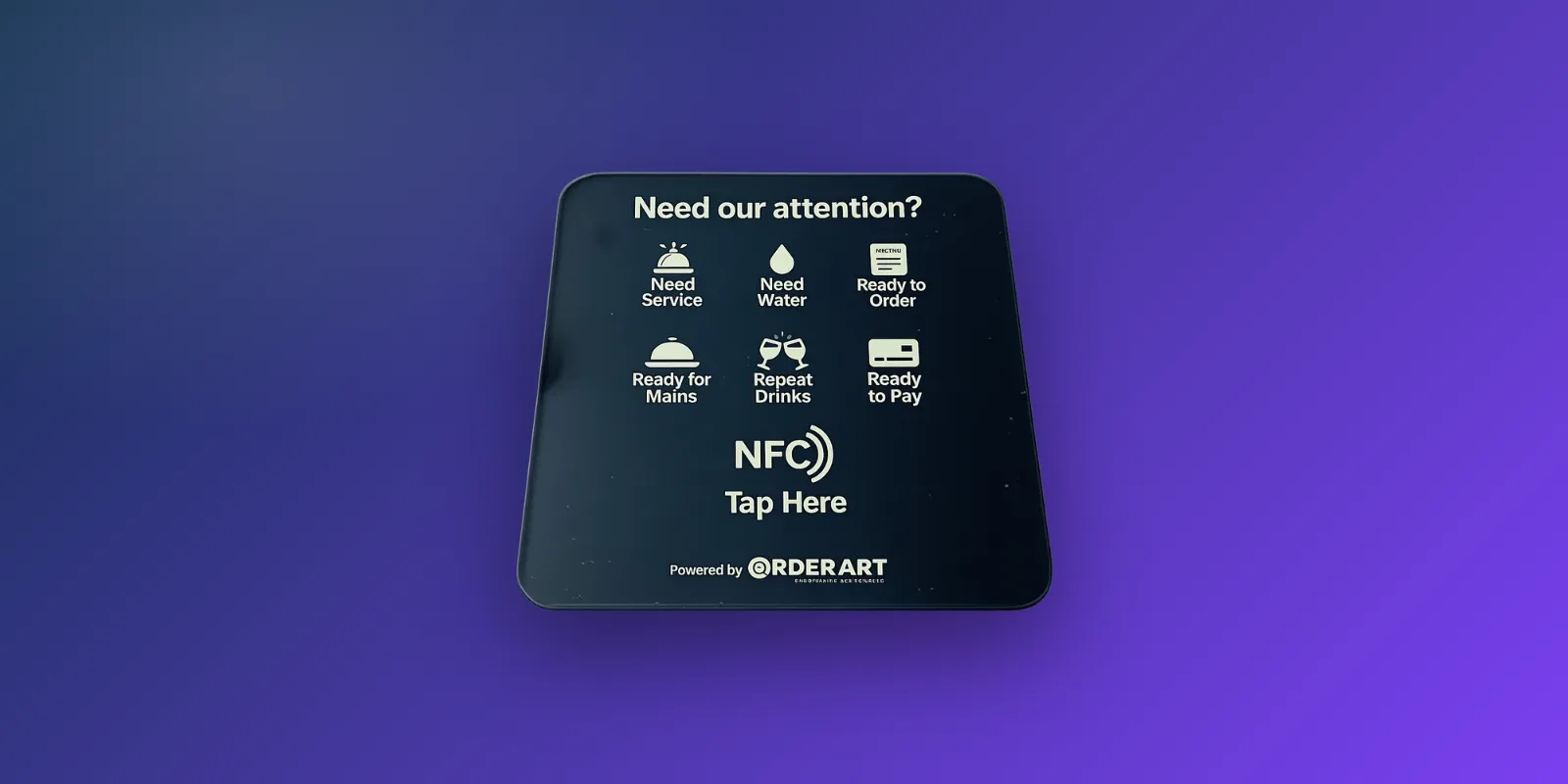
Table ordering (order-at-table) lets guests order from their own phone. Each table has a QR code to scan or an NFC tag, often on a small stand called a table talker, that opens the menu when a phone is tapped on it. Because the link is unique to the table, the order arrives with the table number attached.
QR code vs NFC
| QR code | NFC tag | |
|---|---|---|
| How guests open it | Open the camera and scan | Tap the phone on the tag |
| Speed | A few seconds | Usually faster |
| Works on | Almost any phone with a camera | Most modern phones with NFC switched on |
| Cost | A printed code | An NFC table talker |
Many venues offer both on the same table talker.
Where table ordering helps
- Busy casual venues, beer gardens and food halls
- Extra rounds of drinks and desserts without waiting for staff
- Accurate orders, because guests choose their own options
- Fewer trips to the counter for staff
Where it doesn’t
Some guests prefer to order from a person, and fine-dining service depends on it. The best setups offer table ordering as an option, not the only way to order, and keep staff on the floor to help.
What to check
- Orders land on the right table and go straight to the kitchen or printers
- The table menu uses the same menu, prices and sold-out items as the POS
- Guests can pay at the table, or add to a tab you settle at the end
- Deals and specials apply to table orders too
- It works without an app download
How OrderArt does it
With OrderArt’s NFC table ordering add-on, guests tap their phone on the table talker to open a menu unique to that table. They order and pay, and the order lands on the right table every time. See the table talker.
Specials work at the table too. With Happy Hours & Specials, you schedule a deal once, by day, time or date, and switch it on for NFC Table Ordering as well as the POS and your website. Prices go back to normal the moment the promotion ends.
Frequently asked questions
Do guests need an app for table ordering?
No. A QR code or NFC tag opens the menu in the phone’s browser.
Does table ordering replace waiters?
No. It takes routine orders off staff so they can spend more time looking after guests.
Can guests pay at the table?
Yes. With OrderArt’s NFC table ordering, guests order and pay from their phone.
Do happy hour prices work with table ordering?
Yes. OrderArt’s Happy Hours & Specials can be switched on for NFC Table Ordering, so scheduled specials show at the table and prices revert automatically when they end.
Is NFC better than a QR code?
NFC is usually faster because guests just tap, while QR codes work on almost any phone with a camera. Many venues offer both.